Windows Search 提供快速搜尋但會建立索引佔用資源。若不需此功能,可選擇暫停服務、停用啟動,或徹底解除安裝功能元件。
方法一:服務管理暫停/停用(可隨時恢復)
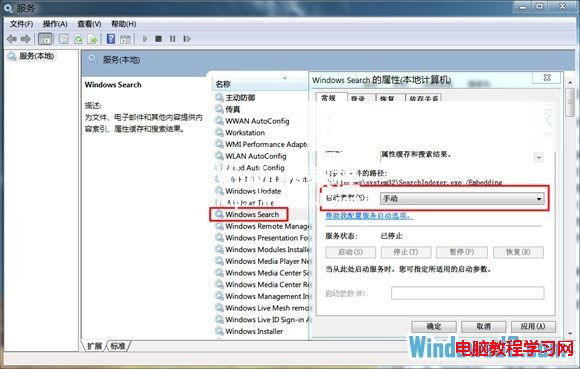
- 控制台 → 系統管理工具 → 服務。
- 找到 Windows Search,雙擊開啟內容。
- 「啟動類型」改為「手動」或「停用」 → 若正在執行點擊「停止」 → 確定。
方法二:控制台解除安裝 Windows 功能(徹底移除)
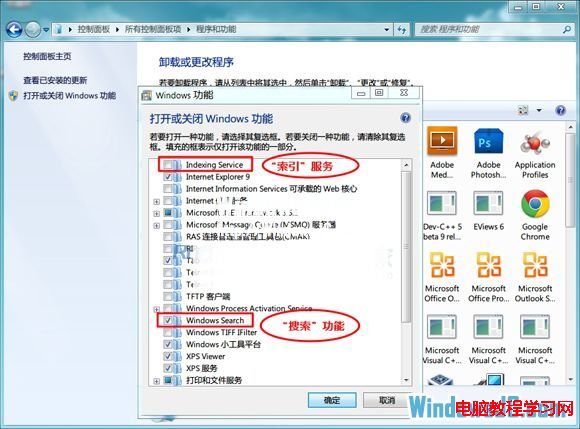
- 控制台 → 程式和功能 → 左側「開啟或關閉 Windows 功能」。
- 取消勾選:
☐ Indexing Service (索引服務)
☐ Windows Search (搜尋功能)
- 確定 → 系統移除元件 → 重新開機。
建議:若保留開始選單搜尋框,僅取消「Indexing Service」;若完全不需搜尋功能,兩項皆取消。解除安裝後搜尋框將消失,如需恢復請重新勾選並重開機。