Windows XP Windows 7 Windows 2003 Windows Vista Windows 綜合教學 Linux 系統教學
Windows 10 Windows 8 Windows 2008 Windows NT Windows Server 電腦軟體教學

Windows 7 智慧建立還原點:節省硬碟空間

編輯:Windows 7 系統介紹

預設行為

Win7 系統還原預設每天自動建立還原點,久而久之佔用大量硬碟空間。可透過登錄修改建立間隔,使其更「智慧」。

修改還原點建立間隔

  1. Win+R 輸入 regedit。
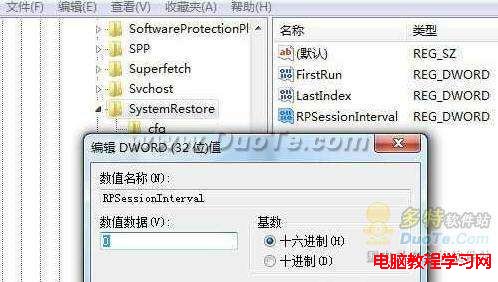
  2. 瀏覽至 HKEY_LOCAL_MACHINE\SOFTWARE\Microsoft\Windows NT\CurrentVersion\SystemRestore。
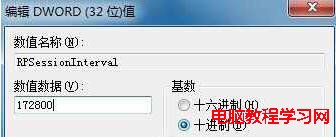
  3. 找到 RPSessionInterval(預設為 0,單位秒),雙擊修改為十進位數值:
     • 2 天:172800
     • 3 天:259200
     • 依此類推(秒數 = 天數 × 86400)
  4. 確定並重新開機或重新啟動「系統還原」服務生效。

RPSessionInterval 預設值
設為 172800 兩天

此設定不影響手動建立還原點、安裝程式/驅動/更新前的自動建立,僅延長定期自動建立的間隔,平衡保護與空間。

Copyright © Windows教程網 All Rights Reserved