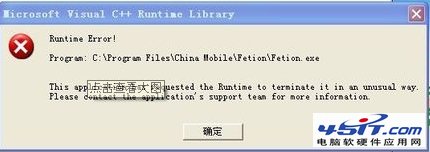
啟動飛信時彈出「Microsoft Visual C++ Runtime Library Runtime Error」對話框,程式異常終止。
舊版飛信遺留的設定檔/快取資料與新版本不相容,導致 C++ 執行階段庫初始化失敗。
C:\Users\<用戶名>\Documents\fetion
C:\Documents and Settings\<用戶名>\My Documents\fetion
迅雷另類斷點續傳:換網址接力下載,同檔案大小/格式即可續傳
Outlook 撤回已寄出錯誤郵件:條件與步驟完整說明
Outlook 與 Outlook Express 差異大比較:功能、定位與適用對象完整分析
騰訊微博暱稱如何修改?兩步驟快速完成
微信年度點贊數據怎麼看?「歡迎頁」一鍵查看送出/收到贊總數
Win7 IE8 點擊網頁發出「咚咚」聲音?一鍵還原系統聲音方案靜音操作提示音
Chrome 分頁與視窗管理技巧:Session Manager、Simple Window Saver 降低記憶體佔用
郵箱與 IE 安全防護全攻略:客戶端限制、密碼策略、郵件加密、病毒防範、炸彈應對、補丁與備份