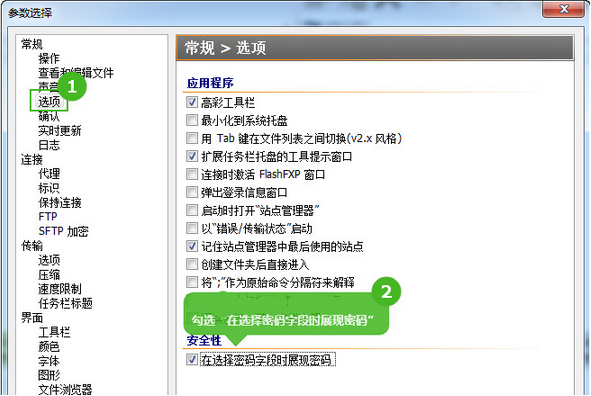
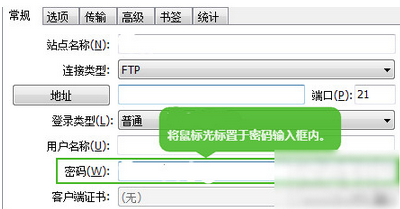
FlashFXP 站點管理器密碼顯示為星號?開啟明文顯示:
方便遷移站點配置、找回遺忘密碼,注意保管安全。
《上古世紀》地獄烈馬「黑矢」獲取全流程:白馬養成→進階任務→覺醒
搜狗皮膚編輯器自製皮膚教學:四模式圖片規格、導航欄設計、另存套用全流程
RAR 加密壓縮檔暴力破解教學:使用 ARPR 工具嘗試恢復密碼
Word 文件轉 PDF 完整教學:Office 2007 內建另存為功能
百度瀏覽器無法登入/異常解決:Internet 選項重置 IE 核心設定
CF QQ 會員專區改版福利:每日簽到、連簽 3 天抽獎、專屬裝備免費領
CF「萌寵大作戰」羊羊獲取全攻略:拾取、擊殺搶奪、近戰全搶、陣亡掉落四大機制詳解
饑荒機器人夏天生存指南:冷火堆/保溫石/冰帽/西瓜帽/龍蠅應對全攻略