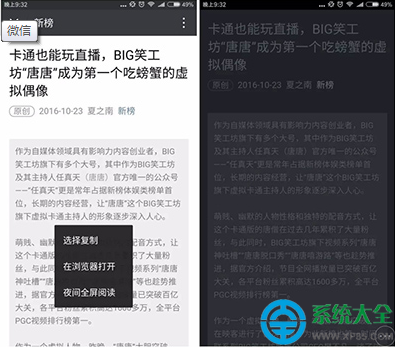
微信 6.3.28 測試版(Android)新增「夜間全螢幕閱讀」功能,晚上看文章不再刺眼。開啟方式超簡單:
正式版推出後,預計所有 Android 用戶皆可使用。iOS 用戶可暫時使用系統級「深色模式」替代。
MyEclipse 資料庫模式過濾優化連線效能:連線設定檔建立 Schema Filter 限制瀏覽範圍
會聲會影捕獲視頻前的完整準備指南
逍遙安卓模擬器開啟 ROOT 權限教程:一鍵獲取最高系統權限
QQ 同步助手 4.7+ 新功能解鎖:面對面批量傳圖 + 雲端 APP 備份管理
Adobe Reader 刪除單頁的三種實用方法
有道雲筆記內容/圖片遺失怎麼辦?歷史版本找回 + 外連圖片避坑指南
Mac 開機出現閃爍問號?啟動磁碟遺失完整修復指南
Ghost 錯誤代碼完整對照表:快速定位還原失敗原因