Windows XP Windows 7 Windows 2003 Windows Vista Windows 綜合教學 Linux 系統教學
Windows 10 Windows 8 Windows 2008 Windows NT Windows Server 電腦軟體教學

Ubuntu 通用 Root 密碼重置:GRUB 菜單進入單用戶模式修改密碼

編輯:Linux 系統常見問題解答

Ubuntu 系列系統忘記 root 密碼,通用解法是通過 GRUB 進入單用戶模式(Single User Mode)掛載根分區為讀寫,直接修改 /etc/shadow。本文梳理通用操作流程(適用 Ubuntu 14.04/16.04/18.04/20.04+)。
操作步驟

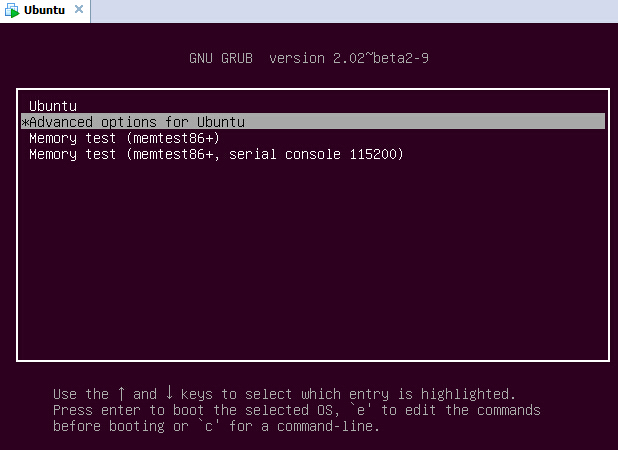
1. 進入 GRUB 菜單

  • 開機時按住 Shift(BIOS)或反覆按 Esc(UEFI),顯示 GRUB 引導菜單。

GRUB 菜單

2. 選擇恢復模式並編輯

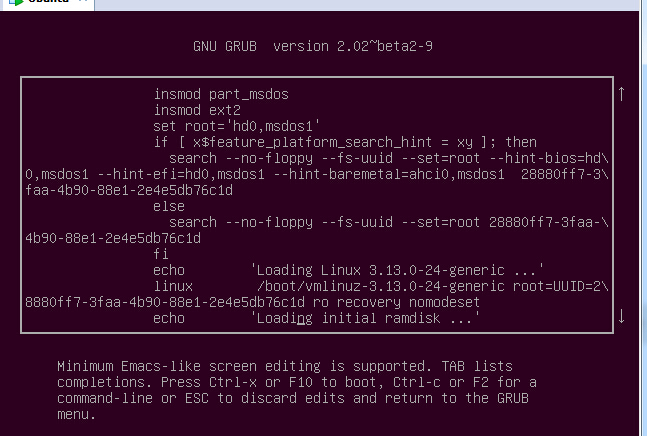
  • 選中 Advanced options for Ubuntu → 選中帶 (recovery mode) 的內核行 → 按 e 進入編輯模式。

編輯 recovery mode 內核行

3. 修改內核啟動參數

  • 找到以 linux 開頭的行,將 ro recovery nomodeset 修改為 rw single init=/bin/bash。
  • 關鍵點:
# 原行
linux /boot/vmlinuz-xxx root=UUID=xxx ro recovery nomodeset

# 修改為
linux /boot/vmlinuz-xxx root=UUID=xxx rw single init=/bin/bash
  • rw:讀寫掛載根分區(必須,否則 passwd 無法寫入)。
  • single / init=/bin/bash:進入單用戶 Shell,繞過正常啟動流程。

4. 啟動並重置密碼

  • 按 Ctrl+x 啟動。
  • 進入 root@(none):/# 提示符。
  • 執行 passwd root 輸入新密碼兩次。

5. 重啟驗證

sync
reboot -f

注意事項與變體

  • 無 recovery mode 選項:直接在默認內核行按 e 修改參數同理。
  • 提示 "Authentication token manipulation error":根分區未正確掛載為 rw,執行 mount -o remount,rw / 後重試。
  • SELinux 系統(非 Ubuntu):重置後需 touch /.autorelabel 並重啟兩次。
  • GRUB 設置密碼保護:防止他人通過同樣方法重置密碼。grub-mkpasswd-pbkdf2 生成哈希 → 寫入 /etc/grub.d/40_custom → update-grub。

核心口訣: Shift/Esc 進 GRUB → e 編輯 recovery 行 → ro 改 rw 加 init=/bin/bash → Ctrl+x 啟動 → passwd root → reboot。

Copyright © Windows教程網 All Rights Reserved