Windows XP Windows 7 Windows 2003 Windows Vista Windows 綜合教學 Linux 系統教學
Windows 10 Windows 8 Windows 2008 Windows NT Windows Server 電腦軟體教學
您现在的位置: Windows教程網 >> Windows教程 >  >> Linux 系統教學 >> Linux 教學

RedHat Linux "command not found" 環境變量修復方案

編輯:Linux 教學

現象

終端輸入常用命令(如 ls、ifconfig、service)提示 command not found,實為 PATH 環境變量丟失或錯誤。
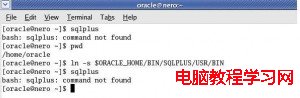
command not found

命令找不到提示

臨時恢復(當前會話有效)

export PATH=/usr/bin:/usr/sbin:/bin:/sbin:/usr/X11R6/bin:

執行後即可正常使用系統命令,重啟後失效。

永久修復(需 root 權限)

  1. 以 root 登錄。
  2. 編輯用戶配置文件:vi ~/.bash_profile 或 gedit ~/.bash_profile。
  3. 找到 PATH=$PATH:$HOME/bin 行,修改為完整系統路徑:
    PATH=/usr/bin:/usr/sbin:/bin:/sbin:/usr/X11R6/bin:
  4. 保存退出,下次登錄生效(或執行 source ~/.bash_profile 立即生效)。

根因分析

  • 用戶誤修改 .bash_profile 導致 PATH 被覆蓋為空或錯誤值。
  • 安裝第三方軟件腳本不當修改了環境變量。
  • 切換 Shell(如 bash→zsh)未同步配置文件。

最佳實踐

  • 修改 PATH 時保留原值:export PATH=$PATH:/new/path。
  • 系統級命令路徑(/usr/bin、/bin、/sbin 等)應始終包含在 PATH 中。
  • 使用 which command 驗證命令路徑是否正確解析。
Copyright © Windows教程網 All Rights Reserved