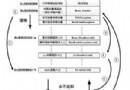
本文系統整理 Linux 開機流程(BIOS → MBR → GRUB → Kernel → Init → 腳本),並針對 MBR 損壞、/etc/fstab 錯誤、GRUB 配置遺失、/etc/inittab 遺失、雙系統引導修復等典型故障,提供單用戶模式、GRUB 命令列、Linux 救援模式三大修復手段的完整操作步驟與實戰案例。
BIOS → MBR (446 bytes) → GRUB Menu → Kernel 載入 → Init (PID 1) → /etc/rc.d/rc.sysinit → 各 Runlevel 腳本
single 或 s 啟動。/etc/fstab、還原配置檔。grub> find /boot/grub/grub.conf
grub> root (hd0,0)
grub> kernel /boot/vmlinuz-... ro root=LABEL=/
grub> initrd /boot/initrd-...img
grub> boot
適用:grub.conf 遺失/損壞、測試新編譯內核。
linux rescue,選擇語言/鍵盤/網路(可跳過)。/mnt/sysimage(選讀寫模式)。chroot /mnt/sysimage 切換至目標系統環境。chroot /mnt/sysimage
grub-install /dev/hda # 或 /dev/sda
exit; exit; reboot
/etc/inittab 遺失修復# 有備份
cp /etc/inittab.bak /etc/inittab
# 無備份,重裝套件
rpm -qf /etc/inittab # 查詢屬於 initscripts 套件
mount /dev/hdc /mnt/source # 掛載安裝光盤
rpm -ivh --replacepkgs --root /mnt/sysimage /mnt/source/Fedora/RPMS/initscripts-*.rpm
# 備份
dd if=/dev/sda of=/tmp/mbr.bak bs=446 count=1

# 還原
dd if=/tmp/mbr.bak of=/dev/sda bs=446 count=1
Linux 終端獲取公網 IP 完整指南:curl/wget/host/dig 多種方法與腳本化示例
Git 三大平台安裝圖解教學:Linux、macOS、Windows 全搞定
CentOS 防火牆開啟/關閉埠口完整指令:iptables 與 firewall-cmd 兩種方式
Linux 內核信號量參數 semopm/semmsl/semopm/semmni 調優:/proc/sys/kernel/sem 與 sysctl 永久生效
Linux 終端顏色輸出完全指南:ANSI 轉義序列、printf 實戰與動態效果