下載 Ubuntu ISO 後務必驗證完整性,防止檔案損壞或被竄改。官方提供 SHA256SUMS (雜湊清單) 與 SHA256SUMS.gpg (GPG 簽名)。驗證流程:導入公鑰 → 驗證簽名 → 核對 SHA256 雜湊值。本文記錄完整指令與輸出解讀。
wget https://releases.ubuntu.com/14.10/SHA256SUMS
wget https://releases.ubuntu.com/14.10/SHA256SUMS.gpggpg --verify SHA256SUMS.gpg SHA256SUMS
# 輸出:
# gpg: Signature made Thu 23 Oct 2014 09:36:00 AM EDT using DSA key ID FBB75451
# gpg: Can't check signature: public key not foundgpg --keyserver hkp://keyserver.ubuntu.com --recv-keys FBB75451
# gpg: key FBB75451: public key "Ubuntu Archive Automatic Signing Key " imported 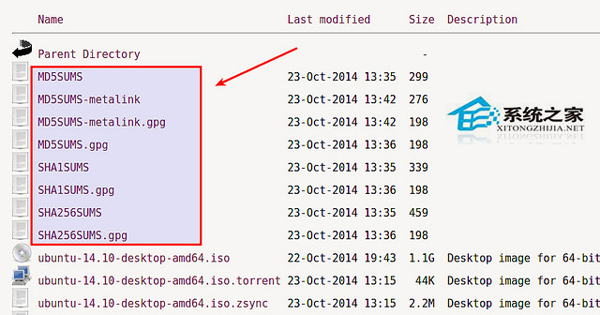

gpg --verify SHA256SUMS.gpg SHA256SUMS
# 輸出:
# Good signature from "Ubuntu Archive Automatic Signing Key "
# gpg: WARNING: This key is not certified with a trusted signature!
# (警告:公鑰未被信任簽名,可暫時忽略,或透過信任鏈認證) 
# 單行指令自動 grep 對應行並驗證
sha256sum -c <(grep ubuntu-14.10-desktop-amd64.iso SHA256SUMS)
# 輸出:
# ubuntu-14.10-desktop-amd64.iso: OK
# 顯示 OK 表示雜湊值匹配,檔案完整下載 ISO + SHA256SUMS + SHA256SUMS.gpg
↓
gpg --verify SHA256SUMS.gpg SHA256SUMS
↓ (公鑰缺失)
gpg --keyserver hkp://keyserver.ubuntu.com --recv-keys KEY_ID
↓
gpg --verify ... (Good signature)
↓
sha256sum -c <(grep ISO檔名 SHA256SUMS)
↓
OK → 檔案完整可用
FAILED → 檔案損壞,重新下載MD5SUMS、SHA1SUMS,但 SHA256 強度最高。https://keyserver.ubuntu.com/pks/lookup?op=get&search=0xFBB75451 網頁下載 .asc 檔再 gpg --import。certutil -hashfile file.iso SHA256 或 Gpg4win 驗證。