Windows XP Windows 7 Windows 2003 Windows Vista Windows 綜合教學 Linux 系統教學
Windows 10 Windows 8 Windows 2008 Windows NT Windows Server 電腦軟體教學
您现在的位置: Windows教程網 >> Windows教程 >  >> Linux 系統教學 >> 關於 Linux

CentOS 7 忘記 root 密碼?單用戶模式重置完整步驟

編輯:關於 Linux

CentOS 7 採用 GRUB2,重置 root 密碼需在 GRUB 選單編輯啟動參數進入單用戶模式 (rd.break 或 init=/sysroot/bin/sh),掛載 sysroot 後修改密碼並重新標記 SELinux 重新標記。

操作步驟

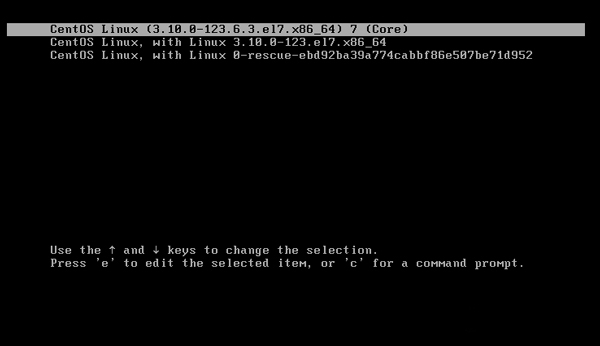
  1. 開機進入 GRUB 選單,選擇啟動項目按 e 編輯。
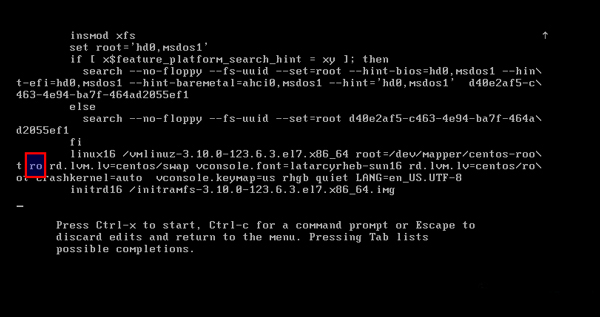
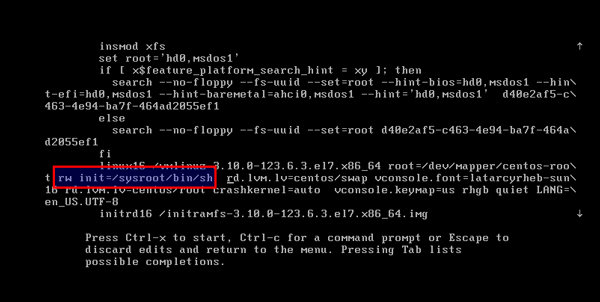
  2. 找到以 linux16 或 linuxefi 開頭的行,將 ro 改為 rw init=/sysroot/bin/sh。
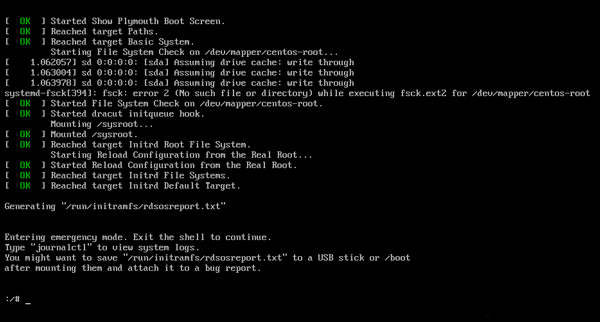
  3. 按 Ctrl+x 啟動進入單用戶模式。
  4. 掛載系統根目錄:
chroot /sysroot
  1. 重置密碼:
passwd root
# 輸入新密碼兩次
  1. 授權 SELinux 重新標記 (關鍵,否則下次開機失敗):
touch /.autorelabel
  1. 退出 chroot 並重啟:
exit
reboot

GRUB 編輯
編輯啟動參數
修改 ro 為 rw init
單用戶模式

關鍵差異: CentOS 6 使用 rd.break 進入 /sysroot 已掛載為唯讀,需手動 mount -o remount,rw /sysroot;CentOS 7 直接用 rw init=/sysroot/bin/sh 以讀寫模式掛載,流程更簡潔。touch /.autorelabel 必不可少,否則 SELinux 會阻止登入。
Copyright © Windows教程網 All Rights Reserved