RRDtool (Round Robin Database) 以固定大小環狀空間存儲時間序列資料,廣泛用於 MRTG、Ganglia 等監控繪圖。本文詳細拆解 rrdtool create 建庫語法 (DS、RRA、CF、PDP、CDP 參數含義)、rrdtool updatev 定時寫入資料、rrdtool graph 繪製堆疊面積圖 (AREA/STACK/LINE/GPRINT/VDEF) 的完整指令範例,並展示含無資料區間的輸出圖片。
建庫 (cpu.rrd,每 15 秒更新):
rrdtool create cpu.rrd \
  --start $(date -d '1 days ago' +%s) --step 15 \
  DS:cpu_user:GAUGE:120:0:NaN \
  DS:cpu_system:GAUGE:120:0:NaN \
  DS:cpu_wio:GAUGE:120:0:NaN \
  DS:cpu_idle:GAUGE:120:0:NaN \
  RRA:AVERAGE:0.5:1:244 \
  RRA:AVERAGE:0.5:24:244 \
  RRA:AVERAGE:0.5:168:244 \
  RRA:AVERAGE:0.5:672:244 \
  RRA:AVERAGE:0.5:5760:374
更新: rrdtool updatev cpu.rrd timestamp:user:system:wio:idle
繪圖: 使用 DEF 取得變數,AREA/STACK 繪製堆疊,VDEF 計算統計值,GPRINT 列印當前/平均值。
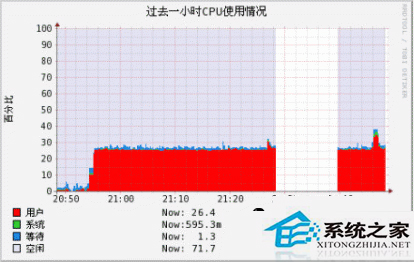
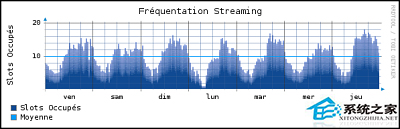
掌握 RRDtool 三步驟,即可自建輕量級時間序列資料庫與即時圖表系統。
Ubuntu 搭建 J2EE 開發環境:JDK 7、Tomcat、MySQL 5.6、Eclipse JavaEE 完整安裝配置
Linux 偵測 DVD 燒錄機裝置名稱與寫入速度:dmesg、lsscsi、/proc、wodim、dvd+rw-mediainfo 五法對比
Linux 磁碟空間尚餘但無法寫入檔案?inode 耗盡完整排查與解決指南
Linux Shell 腳本自動備份系統檔案:支援完整/增量備份、快照、互動確認與定時清理
Linux 掛載 NTFS 格式 USB 隨身碟提示 unknown filesystem 解決方案