Windows XP Windows 7 Windows 2003 Windows Vista Windows 綜合教學 Linux 系統教學
Windows 10 Windows 8 Windows 2008 Windows NT Windows Server 電腦軟體教學
您现在的位置: Windows教程網 >> Windows教程 >  >> Linux 系統教學 >> 關於 Linux

crontab 定時任務建立全流程:啟動服務、編輯語法、時間欄位解析、常見範例

編輯:關於 Linux

啟動 crond 服務

/etc/init.d/crond start

crontab 指令

  • crontab -l 顯示目前排程
  • crontab -r 刪除所有排程(慎用)
  • crontab -e 編輯排程(預設編輯器)

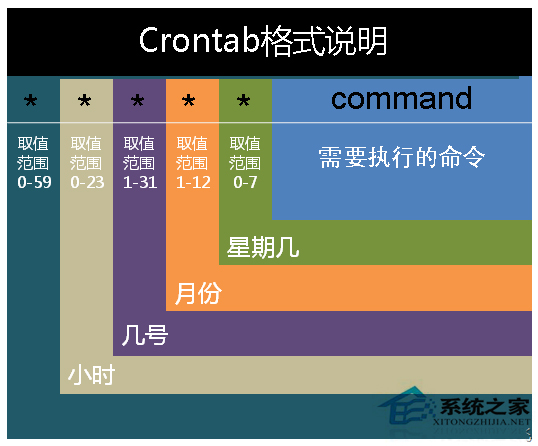
時間欄位格式

分 時 日 月 週  指令

常見範例

0 4 * * 2,5 /usr/bin/wall < /etc/motd
# 每週二、五 04:00 廣播 /etc/motd 內容

*/2 12-14 * 3-6,9-12 1-5 /path/to/script.sh
# 每年 3-6 月、9-12 月,週一至週五,12:00-14:00,每 2 分鐘執行一次 script.sh

系統層級排程檔:/etc/crontab

結語

掌握 crontab -e 編輯與時間欄位語法,即可靈活部署各類定時維運任務。

Copyright © Windows教程網 All Rights Reserved