cd C:\jtools\h2\bin
java -cp h2-1.4.188.jar org.h2.tools.Server
瀏覽器開啟 https://localhost:8082,設定:
JDBC URL: jdbc:h2:tcp://localhost/~/jcgdb、User: sa。
執行建表腳本:
CREATE CACHED TABLE PUBLIC.JCGEXAMPLE (
  ID INTEGER,
  ARTICLE_NAME VARCHAR(255)
);
INSERT INTO JCGEXAMPLE VALUES (1, 'Jetty JNDI Example');
INSERT INTO JCGEXAMPLE VALUES (2, 'Jetty JMX Example');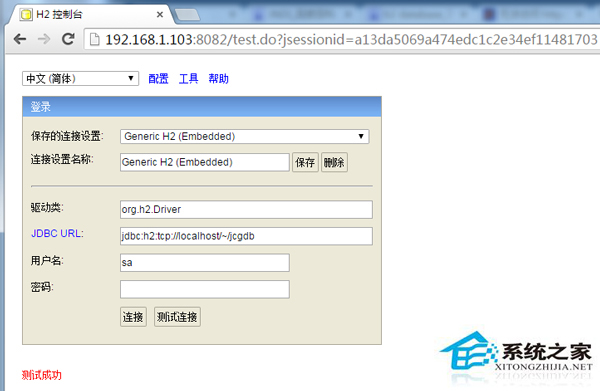
Group Id: com.ch.snippets.enterprise
Artifact Id: jetty-jndi-demo
Packaging: war
pom.xml 引入:
<dependencies>
  <dependency><groupId>org.eclipse.jetty</groupId><artifactId>jetty-server</artifactId><version>9.3.2.v20150730</version></dependency>
  <dependency><groupId>org.eclipse.jetty</groupId><artifactId>jetty-webapp</artifactId><version>9.3.2.v20150730</version></dependency>
  <dependency><groupId>org.eclipse.jetty</groupId><artifactId>jetty-plus</artifactId><version>9.3.2.v20150730</version></dependency>
  <dependency><groupId>org.eclipse.jetty</groupId><artifactId>jetty-jndi</artifactId><version>9.3.2.v20150730</version></dependency>
  <dependency><groupId>com.h2database</groupId><artifactId>h2</artifactId><version>1.4.188</version></dependency>
</dependencies>Jetty 定義的資源需在 web.xml 中 <resource-ref> 宣告,才會映射至 java:comp/env。
完成上述配置,即可在 Jetty 透過 JNDI 查詢 H2 資料源,實現資料庫連線池管理與應用解耦。